

Running payroll in Canada is one of those tasks that looks simple from the outside and gets more layered the closer you look. You owe each employee the right amount on the right day. You owe the CRA the correct deductions on the right schedule. And you owe your future self an audit trail that holds up at year-end.
This guide walks through exactly how to do payroll in Canada, from registering with the CRA to issuing T4s, with the small business owner in mind. No HR department assumed, no prior experience required. By the end, readers will understand what the process looks like, where the common traps are, and how to decide whether to keep running payroll yourself or hand it off to software or a bookkeeper.
What payroll actually means in Canada
Payroll is the full cycle of paying employees and remitting the government’s share of every paycheque. In Canada, that cycle has three parties at the table: you (the employer), your employee, and the Canada Revenue Agency.
Every time you pay someone, you’re splitting their gross earnings into four streams:
- Their net pay — what lands in their bank account.
- CPP (Canada Pension Plan) contributions — deducted from the employee and matched by you as the employer.
- EI (Employment Insurance) premiums — deducted from the employee, with the employer paying 1.4x the employee amount or CRA approved reduced rate for companies with Short Term Disability plans.
- Income tax — federal and provincial. Taking into account the employee’s tax credits filled out on their TD1 forms.
- In Quebec, there are additional source deductions to account for:
You hold all these applicable amounts in trust on the government’s behalf. Employers are then responsible to remit both the employee and employer portions of the CPP/QPP, EI/QPIP and taxes (referred to as source deductions) on the schedule that the CRA assigns, referred to your remitter type. More on that in step 7 below.
That’s payroll in one breath. The rest of this guide covers the specifics.
Who needs to run payroll in Canada
You must run payroll if you pay anyone classified as an employee. That includes:
- Part-time and full-time staff
- Yourself, if you’re an incorporated business owner paying yourself a salary (dividends are handled differently)
- Family members working in the business
You don’t run payroll for:
- True independent contractors — they invoice you, and they’re responsible for their own CPP and taxes
- Board members receiving honoraria — the tax rules differ in those cases
The contractor-vs-employee line matters more than most new employers realize. The CRA looks at control, ownership of tools, chance of profit, and integration with the business — not at how you refer to the relationship in a contract. Misclassifying an employee as a contractor is one of the most expensive mistakes a small business can make.
How to do payroll in Canada: the 8-step process
Step 1
Open a CRA payroll program account
Before you pay your first employee, register for a payroll program account with the CRA. This adds an “RP” extension to your nine-digit Business Number (for example, 123456789 RP0001). You can register online through Business Registration Online (BRO).
If you don’t yet have a Business Number, you’ll have to get one as part of the same registration. Quebec employers also need to register separately with Revenu Québec.
Step 2
Collect employee paperwork
Before the first cheque, each employee should receive a hiring package. You’ll need the following information and documents to process payroll:
Personal information
- Full legal name, home address, phone number, and personal email address.
- Date of birth. Required for certain benefit eligibility calculations and pension deductions (CPP age thresholds, for example).
Payroll documents
- Their Social Insurance Number (SIN). You must obtain the SIN within three days of hire and record the number. SINs beginning with 9 are temporary and have an expiry date you’ll need to track.
- Federal TD1 form. Completed by the employee to declare federal personal tax credit claims.
- Provincial TD1 form. Completed by the employee to declare provincial personal tax credit claims. This form is issued based on their province of employment.
- Direct deposit banking details — a void cheque or direct deposit form with institution, transit, and account numbers. Optional, but strongly recommended as the standard in most workplaces.
Keep these on file (under lock and key). The CRA expects you to be able to produce them for six years.
ⓘ As part of the employee onboarding, Wagepoint helps you collect the required information.
Step 3
Choose a pay schedule
Canada doesn’t mandate a specific pay frequency federally, but provincial employment standards usually require you to pay at least semi-monthly. Common schedules:
- Weekly: 52 pay periods per year. More admin, but employees prefer it.
- Bi-weekly: 26 pay periods. The most common schedule in Canada.
- Semi-monthly: 24 pay periods (typically the 15th and the last day of the month). Cleanest for salaried staff.
- Monthly: 12 pay periods. Only allowed in some provinces and rarely employee-friendly.
Pick one and stick with it. Changing pay frequency later creates prorating headaches, ROEs to be filed with Service Canada and employee friction.
ⓘ Wagepoint’s onboarding process walks you through setting up your payroll schedules and provides a calendar so you never miss payroll deadlines.
Step 4
Calculate gross pay
For each pay period, gross pay is:
- Hourly employees: hours worked × hourly rate, plus any overtime (usually 1.5x but this can vary by province and industry). Learn more about overtime pay in Canada.
- Salaried employees: annual salary ÷ number of pay periods in the year.
- Commission, bonuses, tips reported, vacation, and taxable benefits: added to the gross for the period in which they’re earned.
Don’t forget statutory holiday pay. Each province has its own rules for which holidays qualify, who’s eligible, and how the pay is calculated.
ⓘ Wagepoint automatically calculates all of these pay scenarios.
Step 5
Calculate deductions
This is where most first-time employers run into the complexity. For each employee, each pay period, employers need:
CPP (or QPP in Quebec): Deduct the current-year rate on pensionable earnings as well as the basic exemption amount, prorated per pay period [verify annual amounts and rates] .
A relatively new tier, CPP2 adds additional CPP contributions on earnings between the Year’s Maximum Pensionable Earnings (YMPE) and the Year’s Additional Maximum Pensionable Earnings (YAMPE), something employers also need to account for.
EI: Deduct the current-year employee rate on insurable earnings up to the maximum [verify annual amounts and rates]. As the employer, you contribute 1.4× whatever you deduct . As mentioned previously, Quebec employees have a separate EI rate because QPIP handles parental benefits separately.
Federal and provincial income tax: This is driven by the TD1 claim codes and the employee’s gross pay for the period. The CRA publishes new tax tables annually.
ⓘ Wagepoint handles all source deductions automatically, from calculating to remitting to government agencies on your behalf.
Step 6
Pay your employees
Issue payment by the pay date. Direct deposit is standard; cheques still work. Every employee must receive a pay stub showing gross pay, each deduction, net pay, and year-to-date totals. Several provinces (including Ontario) require specific pay stub content by law. Be sure to check with your provincial authority.
ⓘ Wagepoint automatically creates and distributes paystubs to your employees. Accessible through the employee portal.
Step 7
Remit source deductions to the CRA
Remittance is where a lot of new employers get caught off guard. You’ve deducted CPP, EI, and tax from your employees, and added your employer contributions — now you owe that full amount to the CRA.
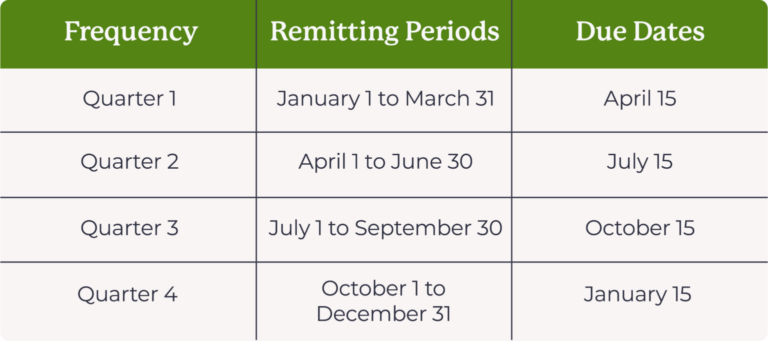
New employers typically default to quarterly remitting if they meet the conditions (monthly withholding under $1,000 with a perfect compliance record) — no application required. Many employers move to regular monthly remittance once their AMWA history is established. The CRA will notify you in writing if your remitter type and threshold changes.
How often you remit depends on your “average monthly withholding amount” (AMWA) from two years ago:
Regular remitter (AMWA under ~$25,000): due by the 15th of the month following payroll.
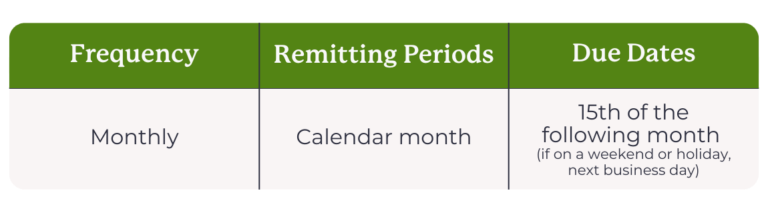
Quarterly remitter (small, eligible new employers): four times a year.
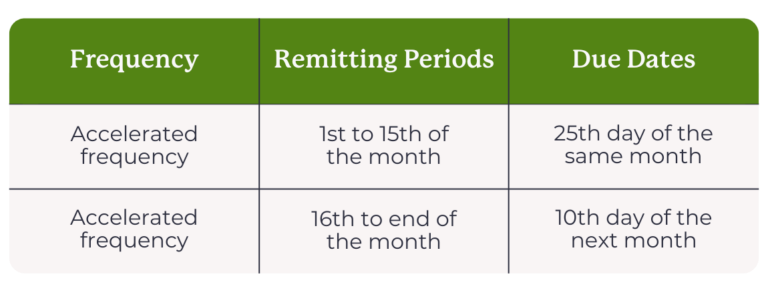
Accelerated threshold 1 (AMWA $25,000–$99,999.99): twice a month.
Accelerated threshold (AMWA $100,000+): 4 times per month
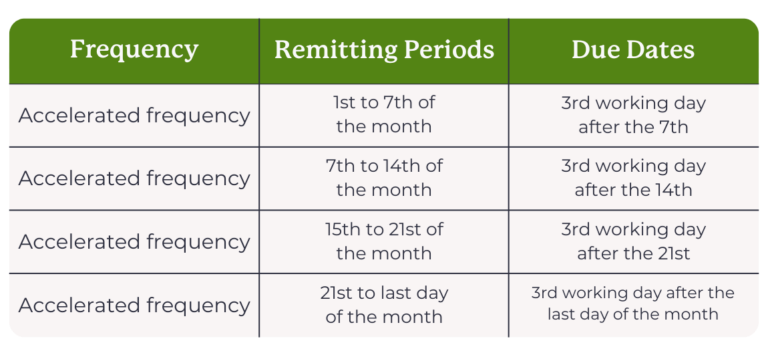
If your remittance date falls on a weekend, the due date defaults to the next business day. It’s important to mention that if an employer chooses to pay through online banking, some banks require the payment to be set up the day before it’s due to the CRA.
Check out CRA’s instructions on how to remit (pay) payroll deductions and contributions.
Late remittances trigger penalties of 3% (1–3 days late), 5% (4–5 days), 7% (6–7 days), and 10% if more than 7 days late or unpaid. Repeat offences in the same calendar year — or knowing/grossly negligent failures — are penalized at 20%, with compound daily interest on top. This is the single most common and most expensive payroll mistake small businesses make.
Here is a full guide on Payroll remittance schedules and deadlines.
ⓘ Wagepoint lets you automate deductions, calculates how much to remit and even remits it to CRA on behalf of employers.
Step 8
Handle year-end
By the last day of February each year, you must:
- Issue a T4 slip to every person you paid more than $500 in the previous calendar year, plus anyone from whom you deducted CPP, EI, or income tax (any amount triggers the slip in that case).
- File a T4 Summary with the CRA reconciling all T4s issued.
- Quebec employers are required to issue RL-1 slips for each employee and file an RLZ-1.S-V to Revenu Québec.
Note: Depending on the province of employment set up for your employees, you may be required to issue a separate T4 for each province where your employee(s) had earnings.
T4s cover employment income, deductions, and a list of taxable benefits and codes. The T4 Summary shows the CRA the total you remitted versus what you should have remitted — any shortfall is payable immediately with interest.
For a deeper dive on each box of the T4 and the most common errors, see our full T4 guide for Canadian small business employers.
ⓘ Wagepoint guides you through year-end and generates all necessary forms.
How payroll works by province
Federal payroll rules (CPP, EI, federal tax, T4s) apply uniformly across Canada. Provincial layers are where things diverge
Every employee’s province of employment determines which provincial rules apply to their pay. That means minimum wage, overtime thresholds, statutory holidays, workers’ compensation among others, all vary by province. For most employees, province of employment is straightforward — but for remote workers, it’s worth confirming, since it doesn’t always match where your business operates or where your employee happens to live.
A few provinces stand out for the complexity they add:
Ontario is where most Canadian small business payroll runs. Alongside federal deductions, Ontario employers deal with Employer Health Tax (EHT) once payroll crosses the annual exemption threshold, WSIB premiums for most industries, and overtime rules under the Ontario Employment Standards Act.
Quebec is the most distinct payroll environment in Canada. Employees contribute to QPP (not CPP) and QPIP (a provincial parental insurance program separate from EI). Provincial income tax is administered by Revenu Québec on its own schedule, not by the CRA. And employers file both a T4 for the CRA and an RL-1 for Revenu Québec — two separate slip types, two filing deadlines, two penalty regimes. If you have Quebec employees, plan for more complexity — or use software that handles it natively.
British Columbia has numerous variables in their Employment Standards act like daily and weekly overtime thresholds (including double-time provisions). Like Ontario, they also have an Employer Health Tax that kicks in above a certain payroll size, and WorkSafeBC.
Alberta as with all provinces, have their own Employment Standards Act as well. Identifying hours-based overtime rules among other legislation. They have no provincial employer health tax, and workers’ compensation runs through WCB-Alberta.
Every other province and territory — the Maritimes, Saskatchewan, Manitoba, Nunavut, the Northwest Territories, and Yukon — has its own minimum wage, overtime rules, stat holiday schedule, and workers’ compensation board.
Provincial rates and thresholds change, often annually. Before processing payroll in a new province, verify the current rules with the relevant provincial employment standards body.
Three ways to run payroll in Canada
There’s no single “right” way. The three realistic paths for a small business are:
Option 1: Run payroll manually
You can do payroll entirely by hand using the CRA’s Payroll Deductions Online Calculator, a spreadsheet for tracking, and your bank’s bill-pay for remittances.
Manual payroll is the path most likely to produce errors, late remittances, and missed rate updates. It’s really only practical for businesses with one or two employees, a consistent schedule, and an owner who genuinely enjoys detail work.
Note: The online calculator print out does not have the legal requirements of a pay stub. You will still be required to produce manual pay statements for all employees. Check out the National Payroll Institutes Pay Statement Guidelines for a full breakdown.
Option 2: Hire an accountant or bookkeeper
Outsourcing payroll to an accountant or bookkeeper removes the time commitment entirely, at a higher monthly cost. Best for owners who’d rather be operating the business than reconciling deductions, managing compliance, or for companies with complex compensation structures.
Option 3: Use payroll software
Payroll software automates deduction calculations, generates pay stubs, files remittances, issues T4s and ROEs, and stays current with rate changes you’d otherwise track yourself. Monthly costs are far less than the cost of a single CRA penalty.
Wagepoint is built specifically for Canadian small businesses and handles all federal and provincial payroll requirements. If you’re comparing options, the best payroll company in Canada is a good starting point.
Common payroll mistakes (and how to avoid them)
The five mistakes we see most often from new Canadian employers:
Mishandling stat holidays. Every province has its own list of statutory holidays and its own formula for holiday pay. Getting this wrong is a very common employment standards complaint.
Missing a remittance deadline. The penalty is a percentage of the amount owed, not a flat fee — so it scales badly. Set a calendar reminder a few business days before each due date, or choose a payroll software that automates these payments for you.
Misclassifying an employee as a contractor. If the CRA reclassifies, you’ll owe both the employer and employee portions of CPP and EI back-dated to the start of the engagement, plus interest and penalties.
Using stale deduction tables. CPP, EI, and tax brackets change every January. Using last year’s tables for even one pay period creates a reconciliation problem at year-end.
Incorrect setup of taxable benefits. The CRA has specific rules about which employee benefits are taxable and which aren’t, and getting it wrong means you’re either over- or under-withholding EI, CPP, and tax. This can compound and create a reconciliation problem at T4 time. When in doubt, check the CRA’s taxable benefits guide or flag it with your bookkeeper or accountant before the first pay run.
Frequently asked questions
How do I manage payroll myself in Canada?
Register for a CRA payroll account, collect TD1 forms and SINs from your employees, choose a pay schedule, and use the CRA’s free Payroll Deductions Online Calculator to compute deductions each pay period. Pay your employees, remit deductions to the CRA by the due date assigned to you, and issue T4s by the end of February each year. Doing it manually is feasible for one or two employees, though most small businesses switch to software once they hit three or more.
How often do I need to pay my employees?
Most provinces require payment at least semi-monthly, and bi-weekly is the most common pay schedule in Canada. Whichever frequency you choose, you must apply it consistently and communicate it clearly to employees.
How much does it cost an employer to run payroll?
Beyond wages themselves, expect to pay roughly 15-20% of gross salary in combined employer costs — CPP matching, EI at 1.4× the employee rate, EHT in provinces that charge it, and WCB/WSIB. If you are an employer with a competitive compensation package with benefits like RRSP matching, you can expect to add another 15-20% in addition.That’s before any financing/banking costs, payroll software costs or a bookkeeper/ accountant who may be supporting your payroll needs.
What happens if I pay employees late or miss a remittance?
Late pay can trigger provincial employment standards complaints — but the impact doesn’t stop there. Employees who aren’t paid on time lose trust quickly, and that erosion can affect morale, retention, and your reputation as an employer.
Late CRA remittances trigger penalties starting at 3% of the amount owed, rising to 10% for repeat offences in the same calendar year, plus interest. Notably, both are avoidable with a clear calendar and automated software.
Do I need to run payroll if I’m the only employee in my own corporation?
Yes, if you’re paying yourself a salary from your incorporated business. You’re an employee of your corporation for payroll purposes, which means the corporation needs a CRA payroll account, deducts CPP and tax (EI is optional for owners with more than 40% share ownership), and issues you a T4.
Dividends, however, are paid differently and don’t run through payroll — talk to an accountant about which mix makes sense for you. Dividends also require the issuance of a T5, due the last day of February.
Ready to make payroll simpler?
Running payroll yourself is absolutely doable — thousands of Canadian small businesses do it every year. But most of them eventually hit a pay period where the cost of the software is less than the cost of the time, the stress, or the one missed remittance.
Start a free Wagepoint trial and run your first payroll in under 15 minutes. Built for Canadian small businesses, every province, every employee type.
This guide is provided for general information and does not constitute tax, legal, or accounting advice. Rates and thresholds change annually; always confirm current figures with the CRA or a qualified advisor before remitting.