
A T4A is the shorthand for the “Statement of Pension, Retirement, Annuity and Other Income.” While that sounds like a mouthful, for most small businesses, it’s simply the way you report payments made to independent contractors.
T4As are more commonly associated with contractor relationships, where no employment contract exists. However, they can also be issued to employees, retired workers and shareholders or directors to account for other types of income as well. Here is a list of exceptions.
Note: Contractors and subcontractors of construction trades are different. Subcontractors of construction trades receive T5018 forms. Those are not covered in this article. Please see here for more information.
Issuing T4As for contractors
As a small business employer, the most common reason you’d issue a T4A is to provide year-end documentation to an independent contractor that indicates how much you paid them. They’ll use this form to file their self-employment taxes and CRA will use the T4A information you filed, to cross-check the two.
The golden rule: If you pay a contractor $500 or more for their services (not including GST/HST) within a calendar year, you must issue a T4A.
Classification risk: CRA may audit the contractor relationship. If the result of the audit decides the worker should have been an employee, you could be held liable for unpaid employer CPP and EI contributions, plus interest.
If you aren’t sure how to distinguish the relationship between an employee and a contractor, check out our guide: Contractor vs. Employee in Canada: What’s the Difference?
Understanding the T4A boxes
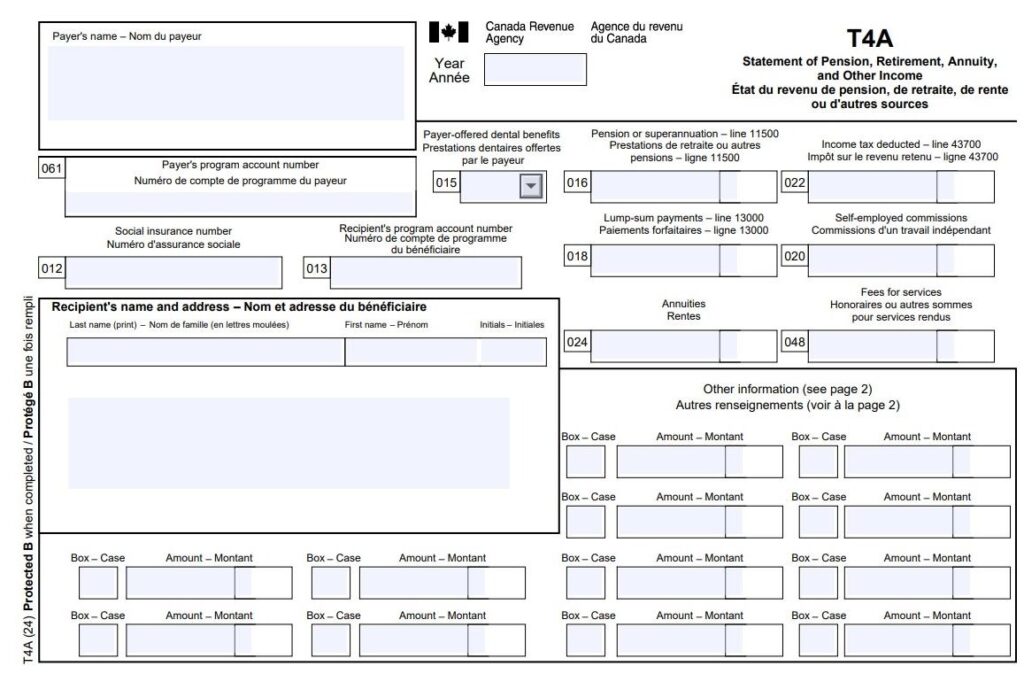
Payer’s and recipient’s information
In this case, the business (you) are the payer and the contractor is the recipient.
Box 012 — Recipient’s SIN
Enter the contractor’s Social Insurance Number (SIN).
Box 013 — Recipient’s account number
If your contractor is registered as a business (sole proprietor, partnership or corporation), they’ll have a CRA business number that you’ll enter here.
Box 015 — Payer-offered dental benefits
This box was introduced to support the Canadian Dental Care Plan (CDCP). For the T4A slip, reporting this information is mandatory if you have an amount in Box 016 (Pension or superannuation). If Box 016 is empty, Box 015 is optional.
You must report whether the recipient — or any of their family members — was eligible to access dental care insurance or coverage of any kind as of December 31 of the reporting year. This includes:
- Co-paid dental benefits
- Health Spending Accounts (HSAs)
- Opt-in dental benefits
Important note: You are reporting on whether the coverage was available to them, regardless of whether they chose to use it or opted out.
Box 015 codes
Use the following codes as outlined by the CRA to indicate the level of access:
- Not eligible to access any dental care insurance or coverage of dental services of any kind.
- Payee only
- Payee, spouse, and dependent children
- Payee and their spouse
- Payee and their dependent children
Box 016 — Pension or superannuation
This is used in specific situations such as payments you made for registered or unregistered pension plans, disability benefits, veterans’ benefits eligible for pension splitting, First Nations, employee benefit plans or retirement compensation arrangements.
Box 018 — Lump-sum payments
Check out these circumstances with lump-sum payments to include in this box.
Box 20 — Self-employed commissions
If you paid your contractor commissions as part of your relationship, enter these amounts here without GST/HST.
Box 022 — Income tax deducted
Unless you deducted income tax for the independent contractor, leave this box blank. (Typically, independent contractors are responsible for their own taxes.)
Box 048 — Fees for services
This is the box most small businesses will use to document the amount paid to a contractor during the calendar year.
Important note: Do not include any GST/HST you paid it along with these fees.
Box 061 — Payer’s account number
This is your business’ payroll account number.
Bottom of T4A — Other information area
The second most common place for small business employers to document amounts paid to contractors is using Code 28 — Other income. Here’s a full list of the income codes for a T4A.
If you have more than 12 codes for the same contractor, create a second T4A. The only thing you have to repeat is your business’s and the contractor’s identifying information.
Other reasons a T4A might be issued:
A T4A may also be issued when you pay any of the following types of income: (In the case of these types of incomes, you issue the T4A because you deducted CPP/QPP and/or EI from the amounts.)
- Pension or superannuation
- Lump-sum payments
- Self-employed commissions
- Annuities
- Patronage allocations
- Registered education savings plan (RESP) accumulated income payments
- RESP educational assistance payments
- Fees or other amounts for services
- Income replacement payments made under the Veterans Well-being Act
- Research grants
- Payments from a registered disability savings plan (RDSP)
- Wage-loss replacement plan payments if you were not required to withhold Canada Pension
- Plan (CPP) contributions and Employment Insurance (EI) premiums
- Death benefits
- Certain benefits paid to partnerships or shareholders
General guidelines for completing a T4A
The following links can help you find more detailed info on T4As:
- T4A Information for Payers
- Guide to Filling Out the T4A Slip
- Full List of T4A Boxes & Codes
- How to Amend or Fix T4A Slips
What is a T4A Summary
If the T4A slips are the chapters of your contractor story, the T4A Summary (T4ASUM) is the table of contents. It reports the totals of all the information you’ve provided on the individual T4A slips for the calendar year.
Key requirements for the T4A Summary
- One per account: You must fill out a separate T4A Summary for each of your payroll program accounts (those 15-character numbers ending in RP0001, RP0002, etc.).
- Match your slips: The totals on your summary must exactly match the sum of all the boxes on your individual T4A slips.
- Report in CAD: Even if you paid a contractor in another currency, all amounts on the summary must be converted to and reported in Canadian dollars.
- Don’t file “nil” returns: If you have no amounts to report and didn’t issue any T4A slips, you don’t need to send a summary to the CRA.
Keep it simple with Wagepoint
Contractor pay shouldn’t be a headache. With Wagepoint, you can pay your contractors right alongside your regular employees. We’ll track the payments throughout the year and generate the T4As for you when February rolls around.
Standard legal disclaimers
Someone’s gotta make the lawyers happy. (Yep, there’s something out there that’s even more painful than payroll, childbirth or gardening documentary marathons.)
The advice we share on our blog is intended to be informational. It does not replace the expertise of accredited business professionals or the responsibility of the business owner to ensure compliance.
To qualify for complimentary T4s with Wagepoint (included as part of your standard fees) — a business must run a minimum of two payrolls in the current calendar year.
Remittance and reporting capabilities within Wagepoint vary by location.