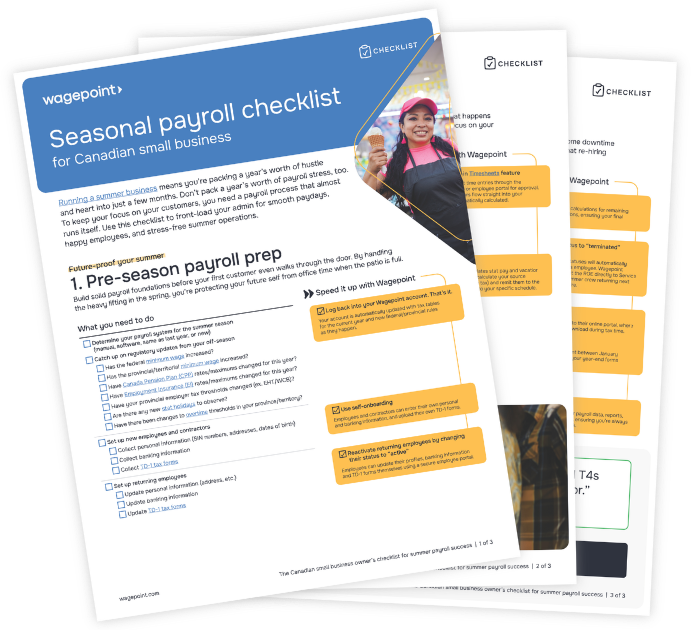

A practical guide to smooth payroll, happy employees, and stress-free summer operations
For many small business owners, summer isn’t just a season — it’s the main event. Whether you’re running a bustling lakeside patio, a busy landscaping crew, or a beloved local ice cream shop, your payroll reality is a different flavour than the spot down the street that’s open year-round.
Managing seasonal payroll in Canada comes with its own set of challenges, from high turnover to those tricky statutory holiday calculations. Having worked with many seasonal businesses over the years, we’ve seen where things go right, and where they can go a bit sideways. We wanted to share those insights with you so you can check compliance and accuracy off your list and get back to what matters most when you’re in the thick of your busiest season.
Can your payroll handle the heat?
If you’re running payroll manually, you’re likely spending more time buried in spreadsheets than out front with your customers. Moving to an automated payroll software can take the grunt work out of your week by calculating net pay, source deductions (like CPP and EI), and employer provincial taxes (EHT, WSIB/WCB).
A good solution will pay your team via direct deposit and remit taxes to the Canada Revenue Agency (CRA), so your financial obligations are met accurately and on time. In other words? Let the software do all the heavy lifting, so you can spend more time on the soft serve.
Choose payroll that goes anywhere
Seasonal businesses aren’t always run from behind a desk. Cloud-based payroll gives you the freedom to manage your team from anywhere, so that payday doesn’t have to pull you away from the action.
“Right from the start, payroll was a breeze. I can run payroll from a tent, a chairlift and my van and be assured that I am doing everything by the book.”
— Alex Ross, CEO and Adventure Guru, Fresh Adventures, Wagepoint customer
Even better, we think you should be able to approve a pay run online so you can stay on-site where your customers and team need you most.
Expert tip: Give your team on-the-go access, too. With the My Wagepoint app, employees can manage time entries and access paystubs right from their phones. It’s one less thing for you to manage.
Hire and re-hire without the brain freeze
Managing seasonal payroll in Canada means your crew is always in motion. You might see returning faces each May, or bring on a fresh batch of first-time workers.
Whether your team is old or new, every team member needs:
- A completed TD1 form (federal and provincial)
- Accurate classification (employee vs contractor)
- Proper payroll setup for deductions (CPP, EI, income tax)
Hit the ground running
If your team members are returning from last year, you shouldn’t have to start from square one. A smart payroll solution allows you to simply reactivate a profile, update the pay rate, and get moving. This isn’t just about saving time; it’s about making your people feel like they belong back on the team the moment they walk through the door.
“We’re a seasonal business for some of our skate pop-ups. Our employees come back in the summer. So it makes it really easy that once they’ve been in our system, if their direct deposit information hasn’t changed, I’m able to just switch it back on and they’re back in our payroll system. It makes it a lot easier for both them and us.”
— Janine Bartels, Co-owner of SUSO Skate Co., Wagepoint customer
Expert tip: While reactivating profiles is a great shortcut, you must confirm that the information in each employee record is still current. Tax credits, home addresses, and banking details can change year to year, so ensure your returning staff update their TD1 forms if their tuition status or personal tax credits have changed.
What to look for in your software
To keep your hiring and re-hiring process seamless, look for these specific features
- Ability to reactivate employees instead of recreating profiles
- Secure storage of past employee data
- Employee self-onboarding that allows new hires to input their own personal and banking information
Compliance doesn’t have to be a rocky road
In Canada, even a short-term summer job has specific legal requirements. This is where things can get a little tricky. To stay on the right side of compliance (and avoid headaches later), keep these three areas on your radar:
1. Statutory holiday pay
Summer is the season of long weekends — Victoria Day, Canada Day, Civic Holiday, and Labour Day. Most seasonal workers are entitled to statutory holiday pay if they meet certain thresholds that vary by province or territory. These include:
- The “30-day” rule: In many provinces, an employee must have been employed for at least 30 calendar days before they are eligible for stat pay.
- The “15 out of the last 30 days” rule: To be eligible, an employee must have worked 15 out of the last 30 days prior to a statutory holiday.
- The “First and Last” rule: To qualify, employees typically must work their last scheduled shift before the holiday and their first scheduled shift after it.
- Averaging formulas: For employees with irregular hours (common in seasonal work), the pay is usually calculated as an average of their wages from the four weeks leading up to the holiday.
Because rules vary significantly by province (for example, Ontario uses a different calculation than BC), look for a payroll solution that automatically applies the correct math based on your location. It removes the guesswork and ensures you aren’t overpaying or underpaying by mistake.
2. Vacation pay
Most seasonal employees don’t stay long enough to take a formal vacation, but they are still legally entitled to vacation pay — at least 4% of their gross wages. Vacation pay rates are directly tied to the amount of vacation time an employee is entitled to under provincial or territorial employment standards.
In a seasonal setup, you have two main ways to handle this:
- Accruing vacation pay: You “bank” the amount and pay it out only when the employee takes time off or when their employment ends.
- Paying out on every cheque: You pay the vacation amount (the 4%) on every single pay run.
To make things easy on yourself, consider paying out vacation pay on every cheque. This ensures that when the season ends and your team moves on, your balance sheet is clean, everyone has been paid in full, and there are no lingering calculations to worry about once your doors close.
3. Records of Employment (ROEs)
When the leaves start to turn and the season winds down, you are required to issue Records of Employment (ROEs). This must be done within five days of the end of the final pay period, and allows your team to access off-season benefits like Employment Insurance (EI).
Even with a handshake agreement for next season, Canadian regulations require an ROE to be issued whenever an “interruption of earnings” occurs. This is defined as any period of seven consecutive days without work and insurable earnings (AKA income that qualifies for EI).
Expert tip: Choose a payroll software like Wagepoint that lets you set an employee’s status to “on leave” rather than “terminated.” This automates your ROE filing at the end of the season and makes reactivating them next year a one-click process.
Remember year-end (even in August)
After your business closes for the winter, your payroll responsibilities have one final milestone: T4s.
In February, you’ll need to issue tax slips for every person who worked for you, even if they only stayed for a few weeks the previous July. One of the biggest pain points for seasonal owners is trying to track down former employees months after the shop has closed. Whether they’ve moved back to campus or started a new gig, getting them their tax documents shouldn’t require a private investigator.
By using a cloud-based system, you ensure that your data is secure and accessible during the off-season. You won’t have to go digging through a dark office for paper files in the middle of winter; you can simply log in, review and file your T4s, and allow employees to log in and download their own copies.
“With T4s at the end of every tax year, I email all our staff from the previous year and let them know that they can download it themselves and it’s all calculated and I don’t know how, but it’s there when I need it.”
— Janine Bartels, Co-owner of SUSO Skate Co., Wagepoint customer
Making seasonal payroll simple
Your summer should be spent focusing on your customers and your craft, not wrestling with tax tables and spreadsheets. Access the Summer Payroll Checklist for Canadian Small Businesses below to walk through every step you need to take before, during, and after your season to keep the CRA happy and your team paid.
A stress-free summer starts with this checklist